
许多年以后,面对 goland 编辑器,我准会想起找到 bug 的那个遥远的下午。
起因
这是个历史遗留问题了,从 2 年前这个组件创建到现在。但是 Deployment 会自动拉起 OOM 的 Pod, 所以也不影响使用,直到最近开始加强了对组件的监控,才发现这个问题,于是这个锅就到了我的头上。
排查
问题确认
开始还是肉眼看代码,但是作为一个陈年老 bug 当然不可能这么容易的被我发现,所以第一步肯定是失败了。接着借用了 golang 的 pprof 工具,发现大部分内存都卡在了 kubernetes 一个库的调用上,即如下代码:
var queue workqueue.RateLimitingInterface

func enqueue(rk *key) {
	queue.AddRateLimited(rk)
}
到这里还是比较懵逼,后面去看下了其他组件 queue.RateLimitingInterface 的用法,发现这里不应该调用 queue.AddRateLimited,
而是应该使用 queue.Add。把这个地方改了之后重新去跑了一段时间去看内存,发现内存确实稳定了,不再继续增长了。
问题分析
那么为什么 queue.RateLimitingInterface 会导致 OOM 呢,这里先找到了最佳实践,即 sample-controller 和 controller-runtime,以及一个 issue, 发现正确的用法是这样的:
The rule of thumb is: use AddRateLimited when you're retrying after an error, use Add when you're reacting to a change. For retry-able errors you'll want to do increasing backoff between consecutive attempts on the same key (with a ceiling, of course).
整理了一个关系图:
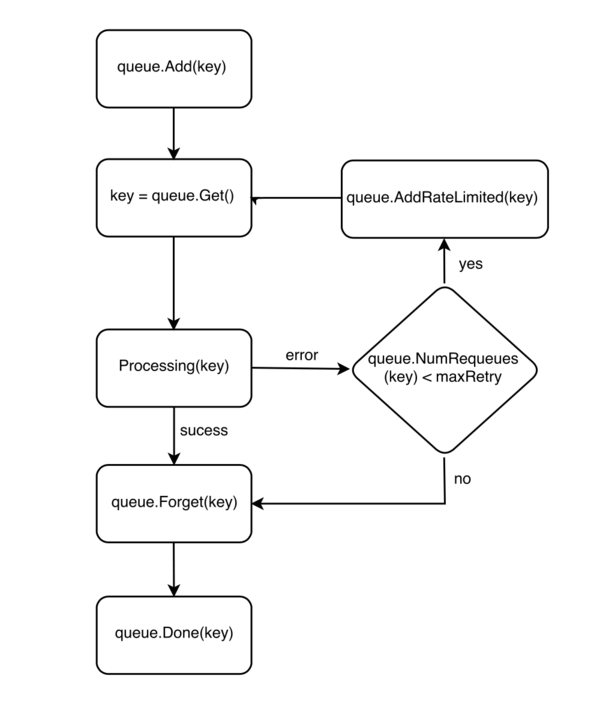
而导致 bug 的这个地方在一开始就使用了 queue.AddRateLimited,这个函数会带来 latency,但是仅仅是有点延迟但也能处理的,不应该会有 OOM 的情况发生,但是重新的去看 queue.RateLimitingInterface 这个 interface,
type RateLimitingInterface interface {
	DelayingInterface

	// AddRateLimited adds an item to the workqueue after the rate limiter says it's ok
	AddRateLimited(item interface{})

	// Forget indicates that an item is finished being retried.  Doesn't matter whether it's for perm failing
	// or for success, we'll stop the rate limiter from tracking it.  This only clears the `rateLimiter`, you
	// still have to call `Done` on the queue.
	Forget(item interface{})

	// NumRequeues returns back how many times the item was requeued
	NumRequeues(item interface{}) int
}
你就会发现这个还有个 function Forget, 这个 function 是用来清理 rateLimiter 的,而使用的地方始终没有去调用这个 function。接下来再去去分析了下 queue.AddRateLimited 的实现,发现这个函数实际调用的又是 q.DelayingInterface.AddAfter(item, q.rateLimiter.When(item)), AddAfter 的代码如下:
// AddAfter adds the given item to the work queue after the given delay
func (q *delayingType) AddAfter(item interface{}, duration time.Duration) {
	// don't add if we're already shutting down
	if q.ShuttingDown() {
		return
	}

	q.metrics.retry()

	// immediately add things with no delay
	if duration <= 0 {
		q.Add(item)
		return
	}

	select {
	case <-q.stopCh:
		// unblock if ShutDown() is called
	case q.waitingForAddCh <- &waitFor{data: item, readyAt: q.clock.Now().Add(duration)}:
	}
}
这里会根据传入的 duration 来决定是立刻去处理这个 item 还是延迟 duration 的时候后去处理,所以这里还是要看下 q.rateLimiter.When(item) 的实现:
func (r *ItemExponentialFailureRateLimiter) When(item interface{}) time.Duration {
	r.failuresLock.Lock()
	defer r.failuresLock.Unlock()

	exp := r.failures[item]
	r.failures[item] = r.failures[item] + 1

	// The backoff is capped such that 'calculated' value never overflows.
	backoff := float64(r.baseDelay.Nanoseconds()) * math.Pow(2, float64(exp))
	if backoff > math.MaxInt64 {
		return r.maxDelay
	}

	calculated := time.Duration(backoff)
	if calculated > r.maxDelay {
		return r.maxDelay
	}

	return calculated
}
看到这里大概的原因就找到了,每次调用 AddRateLimited 的时候对应的 item 的 failures 就会加 1,这样每次的 backoff 就会指数级变大,但是程序里面又没有调用 Forget 去清理 failures, 所以随着 AddRateLimited 的调用,item 被存在内存中的时间也就越久,就像一个流入大于流出的水池,一直在注水缺没有去消耗水。